Mega Man 8-Bit Deathmatch Forum
Showing Results For:

Sprites/Graphc Artists of MM8BDM.
https://www.spriters-resource.com/submitter/hansungkee/
https://www.deviantart.com/hansungkee


Sprites/Graphc Artists of MM8BDM.
https://www.spriters-resource.com/submitter/hansungkee/
https://www.deviantart.com/hansungkee
July. 21, 2024, 11:11 AM
NG Cast as MM8BDM Skins
Cassandra : Finished by Hansungkee
Skin, Mugshot by Hansungkee
Skin Design by AfroNinja360
Pk3 by Z-dagger
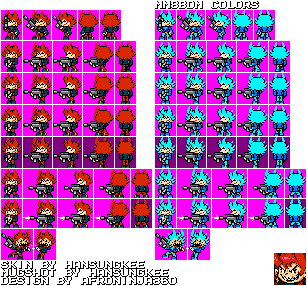
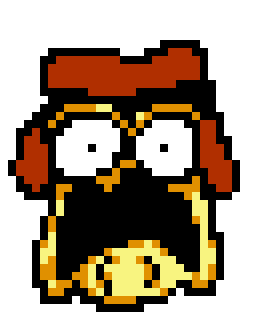
Cassandra is Who's Started the Class massacre on School in Her revolution, She was Defeated by Pico in 6 Years Ago.
Skin, Mugshot by Hansungkee
Skin Design by AfroNinja360
Pk3 by Z-dagger
Cassandra is Who's Started the Class massacre on School in Her revolution, She was Defeated by Pico in 6 Years Ago.
Making mods in my spare time
Known as: The Bloons mod guy.
July. 21, 2024, 7:02 AM
Cobra's MM8BDM mod updates
Weekly mod news 21/7/2024 "Sniper monkey gets neat changes & more"
Bloons mod: "Fixing bugs & big quality of life changes to the sniper monkey!"
1. sniper monkey scope has 4 stages and does not have an aim limitation anymore
2. Boomerang, glue, sniper, mortar, super & ninja monkey shop HUDS adjusted to not have the sell bar on top of the upgrade name.
3. Fixed a bug of, *breathes in*, a fortified-camo-regrow-ceramic bloon having the ability to phase through all projectiles except for explosives. *what a mouthful*
4. new super monkey skins:
Super range 020superMonkey
Ultra Vision 002superMonkey
5. All sniper monkey weapon HUDs updated!
6. Sniper monkey weapons now have scoped & unscoped firing animations.
7. Sniper monkey weapons have been optimized reducing file size by more than 30%!
8. New sniper monkey zoom level icons, ranging from a calm monkey to a really focused killer.
Platformer mod: "more animations"
1. Bass class animations improved to have midair & ground animations
Tower defence prototype: "Voxels & updating map paths"
1. added a new voxels to a tower type
2. experimented with enemy paths
Other:
1. Made plans to make a video for next week, "How to make mods for MM8BDM in slade!" just covering the basics for this one.
Plans for next week? More work on bloons mod & platformer mod, and I plan to make a video during the week as well.
For those I don't have access to my mod works on discord here are what the new sniper weapon HUDs look like.

I really focused my energy on the sniper monkey in the bloons mod for this week, he feels better to play now but I still need to do some balancing that will be done when all the monkey weapon HUDs are done.
Bloons mod: "Fixing bugs & big quality of life changes to the sniper monkey!"
1. sniper monkey scope has 4 stages and does not have an aim limitation anymore
2. Boomerang, glue, sniper, mortar, super & ninja monkey shop HUDS adjusted to not have the sell bar on top of the upgrade name.
3. Fixed a bug of, *breathes in*, a fortified-camo-regrow-ceramic bloon having the ability to phase through all projectiles except for explosives. *what a mouthful*
4. new super monkey skins:
Super range 020superMonkey
Ultra Vision 002superMonkey
5. All sniper monkey weapon HUDs updated!
6. Sniper monkey weapons now have scoped & unscoped firing animations.
7. Sniper monkey weapons have been optimized reducing file size by more than 30%!
8. New sniper monkey zoom level icons, ranging from a calm monkey to a really focused killer.
Platformer mod: "more animations"
1. Bass class animations improved to have midair & ground animations
Tower defence prototype: "Voxels & updating map paths"
1. added a new voxels to a tower type
2. experimented with enemy paths
Other:
1. Made plans to make a video for next week, "How to make mods for MM8BDM in slade!" just covering the basics for this one.
Plans for next week? More work on bloons mod & platformer mod, and I plan to make a video during the week as well.
For those I don't have access to my mod works on discord here are what the new sniper weapon HUDs look like.
I really focused my energy on the sniper monkey in the bloons mod for this week, he feels better to play now but I still need to do some balancing that will be done when all the monkey weapon HUDs are done.
Magnet Dood Administrator
Good to have you on the bad side, Mega Man.


July. 20, 2024, 10:58 PM (Edited by Magnet Dood)
MMSP: Cossack Crusaders (V1A RELEASE)
Greetings from Cossack Laboratories!
As some folks might have seen on Discord, we've been making a rather large amount of progress towards our v1 release! The original plan was to release with only three stages and weapons, and we did indeed get those finished... but we had such a surge of energy, that we decided to make even more for our first version!
Anyone who played the original MMSP mod by Cutmanmike knows there were four stages to run 'n' gun through, so here is a preview to show off what we were working on for most of June & July!
We also conducted our first online test, and even got a family photo!

Psh, Pharaoh Man's such a show-off...
Unsurprisingly, there were many little tweaks to make after all the content we've made actually hit an online server for the first time! But it's fun seeing this come closer and closer to reality.
One of our intrepid playtesters, however, decided to try out an entirely new system that will really give this mod some fun replayability...
As a final quick note, I want to give some special shoutouts to the folks who made this possible.
MegaVile: We would still be dead in the water if you didn't give this project a jolt of energy like you did for the past few months. Thank you so much for your hard work on the weapons and Gemini Man's enemies!
Trillster: For handling the tough work of getting our 5 year old spaghetti code modernized and tackling the behemoth of the hub. You're an absolute wizard with the engine, and I wouldn't even know where to start on most of the things you've helped us with.
Cutmanmike: For coming up with the idea of the enemy variants in the first place! It's made me positively giddy to have you, the game's forefather, enjoy our mod, let alone code an entirely new feature for us. You've been a huge creative inspiration for me for the past 13 years, and to work with you on this is such an awesome opportunity.
I can't give any solid dates for when v1 releases, as we want to make sure the experience is as smooth, bug-free, and fun as possible. Feel free to start ripping my head off if 2025 rolls around and it's still not out, though.
Until next time!
- Cossack Labs
As some folks might have seen on Discord, we've been making a rather large amount of progress towards our v1 release! The original plan was to release with only three stages and weapons, and we did indeed get those finished... but we had such a surge of energy, that we decided to make even more for our first version!
Anyone who played the original MMSP mod by Cutmanmike knows there were four stages to run 'n' gun through, so here is a preview to show off what we were working on for most of June & July!


We also conducted our first online test, and even got a family photo!
Psh, Pharaoh Man's such a show-off...
Unsurprisingly, there were many little tweaks to make after all the content we've made actually hit an online server for the first time! But it's fun seeing this come closer and closer to reality.
One of our intrepid playtesters, however, decided to try out an entirely new system that will really give this mod some fun replayability...

As a final quick note, I want to give some special shoutouts to the folks who made this possible.
MegaVile: We would still be dead in the water if you didn't give this project a jolt of energy like you did for the past few months. Thank you so much for your hard work on the weapons and Gemini Man's enemies!
Trillster: For handling the tough work of getting our 5 year old spaghetti code modernized and tackling the behemoth of the hub. You're an absolute wizard with the engine, and I wouldn't even know where to start on most of the things you've helped us with.
Cutmanmike: For coming up with the idea of the enemy variants in the first place! It's made me positively giddy to have you, the game's forefather, enjoy our mod, let alone code an entirely new feature for us. You've been a huge creative inspiration for me for the past 13 years, and to work with you on this is such an awesome opportunity.
I can't give any solid dates for when v1 releases, as we want to make sure the experience is as smooth, bug-free, and fun as possible. Feel free to start ripping my head off if 2025 rolls around and it's still not out, though.
Until next time!
- Cossack Labs


July. 17, 2024, 6:27 PM (Edited by Binary)
[GAME MODES] Score Frenzy - Gamemode Compilation
The first (actually) new gamemode I'm willing to showcase...
Multi-Point Capture
This mode works similarly to King Of The Hill, except with multiple points. Capture the most points before time runs out to win.

This game mode requires custom positioning setup similar to Evil Escort, however it will always spawn a control point in the center of the map.
Multi-Point Capture
This mode works similarly to King Of The Hill, except with multiple points. Capture the most points before time runs out to win.
This game mode requires custom positioning setup similar to Evil Escort, however it will always spawn a control point in the center of the map.

July. 17, 2024, 6:09 AM (Edited by Stardust Motion)
Public Resource Dump Thread
somewhat discord can be used as a search engine and I found some nice resources with the right keywords
here's a every map existing for server hosting (2024/06)
https://pastebin.com/9Z4uPjMP
here's a every map existing for server hosting (2024/06)
https://pastebin.com/9Z4uPjMP
July. 14, 2024, 6:44 PM
Pharaohman X?

the fix your mod guy
July. 14, 2024, 11:41 AM
[Allanx Inc] UNTITLED BOSS SYSTEM
Untitled Boss System is a juggernaut style gamemode pits survivors against a single player with beefed up stats, who is transformed into a specific class for a limited time. The objective is to defeat the boss before time runs out. There are two special minigame rounds, Free For All/Team Deathmatch, and Zombie Infection. It is inspired by the Saxton hale mod and Unholy.
What else is there in this mod?
- MODIFIERS
At random, The game will give each player (including the boss) a modifier that switches up the game and balance for everybody. (better hope you don't get a curse lol)

- Modular Powerprotection Compatibility for Weapon Packs
- You have the ability to add custom protection for your weapon packs, so that if you ever choose to host this mod with weapon packs, your teammates will not be hurt by them. (this is currently unavailable in 2.1, but will be available when 2.2 comes out!)

- Additional Bonus Rounds!
- As of right now, two additional bonus rounds are included (Free-For-All and Zombie Invasion)
- Free for all is self explanatory, everybody against everybody
- Zombie Invasion is also pretty simple. one person gets morphed into a boss zombie and is tasked to infect (or kill) everybody until time runs out.

- There's so much more i can include here but i'll be here all day if i do that
- Download the mod here:
Main File: https://allfearthesentinel.com/zandronum/download.php?file=untitledbosssystem-v2.1h2.pk3
Music File: https://allfearthesentinel.com/zandronum/download.php?file=untitledbossstereo-v2.1.pk3
Latest public build is 2.1, Which at the moment is in a pretty buggy state, its better to wait until v2.2 comes out before playing)
What else is there in this mod?
- MODIFIERS
At random, The game will give each player (including the boss) a modifier that switches up the game and balance for everybody. (better hope you don't get a curse lol)
- Modular Powerprotection Compatibility for Weapon Packs
- You have the ability to add custom protection for your weapon packs, so that if you ever choose to host this mod with weapon packs, your teammates will not be hurt by them. (this is currently unavailable in 2.1, but will be available when 2.2 comes out!)
- Additional Bonus Rounds!
- As of right now, two additional bonus rounds are included (Free-For-All and Zombie Invasion)
- Free for all is self explanatory, everybody against everybody
- Zombie Invasion is also pretty simple. one person gets morphed into a boss zombie and is tasked to infect (or kill) everybody until time runs out.
- There's so much more i can include here but i'll be here all day if i do that
- Download the mod here:
Main File: https://allfearthesentinel.com/zandronum/download.php?file=untitledbosssystem-v2.1h2.pk3
Music File: https://allfearthesentinel.com/zandronum/download.php?file=untitledbossstereo-v2.1.pk3
Latest public build is 2.1, Which at the moment is in a pretty buggy state, its better to wait until v2.2 comes out before playing)
Making mods in my spare time
Known as: The Bloons mod guy.
July. 14, 2024, 6:59 AM (Edited by El cobra(SkullSnake))
Cobra's MM8BDM mod updates
Weekly mod news 14/7/2024 "Quite the amount of additions"
Bloons mod: "Fixing issues"
1. Fixed an exploit where the regen charm can grant immortality thanks to the "crippled" state, now the charm checks for this state and disables itself while in this state now.
2. Slightly compressed all classes file sizes.
3. fixed a few bloons that couldn't use AUTOPICKUP
Platformer mod: "New class, new weapons & stage select upgrade"
1. Bass class added, with his raging bass buster being aim able in 8 directions!
2. Discovered a bug to the bass buster that wouldn't allow you to aim to the left if you fired to the right and vice versa. Now you can fire in all 8 directions no matter what direction you are facing or which direction you started firing!
3. Improvements to the stage select making it more customisable, the extra stages "metal man & Sky area" are moved to another stage select that you can access by pressing down by The "Mr X symbol".
4. New weapon: Water wave! Create 3 waves of water that move along the floor.
5. Adjustments to gaining copyweps, now only these classes (Megaman & Bass) currently have access to these weapons meanwhile everyone else gets nothing at the moment.
6. All copy weapons now accounts for what class uses them (Megaman can slide using these while Bass does his dash.)
7. New weapon: Napalm Bomb! Throw a small bouncy bomb dealing 3 damage in a small radius, Can be aimed up to throw higher but with less horizontal velocity or aimed down for a really fast floor rolling bomb with no vertical velocity, **Think fast chucklenuts!**.
Other:
1. Looked in my folder of old scrapped mods and dug one out that I thought would be really interesting to work on again. The name? **CobrasKRTowerDefencePrototype**. It's unique but I never really got it to work before, but now I may be able to make it work.
2. CobrasKRTowerDefencePrototype: Enemy pathfinding works & lives lost system works as well.
Plans for next week? More work on bloons mod.
Images for this week:
Stage select is still in the works

there is a second a stage select here, but this one is for bonus levels.

Bloons mod: "Fixing issues"
1. Fixed an exploit where the regen charm can grant immortality thanks to the "crippled" state, now the charm checks for this state and disables itself while in this state now.
2. Slightly compressed all classes file sizes.
3. fixed a few bloons that couldn't use AUTOPICKUP
Platformer mod: "New class, new weapons & stage select upgrade"
1. Bass class added, with his raging bass buster being aim able in 8 directions!
2. Discovered a bug to the bass buster that wouldn't allow you to aim to the left if you fired to the right and vice versa. Now you can fire in all 8 directions no matter what direction you are facing or which direction you started firing!
3. Improvements to the stage select making it more customisable, the extra stages "metal man & Sky area" are moved to another stage select that you can access by pressing down by The "Mr X symbol".
4. New weapon: Water wave! Create 3 waves of water that move along the floor.
5. Adjustments to gaining copyweps, now only these classes (Megaman & Bass) currently have access to these weapons meanwhile everyone else gets nothing at the moment.
6. All copy weapons now accounts for what class uses them (Megaman can slide using these while Bass does his dash.)
7. New weapon: Napalm Bomb! Throw a small bouncy bomb dealing 3 damage in a small radius, Can be aimed up to throw higher but with less horizontal velocity or aimed down for a really fast floor rolling bomb with no vertical velocity, **Think fast chucklenuts!**.
Other:
1. Looked in my folder of old scrapped mods and dug one out that I thought would be really interesting to work on again. The name? **CobrasKRTowerDefencePrototype**. It's unique but I never really got it to work before, but now I may be able to make it work.
2. CobrasKRTowerDefencePrototype: Enemy pathfinding works & lives lost system works as well.
Plans for next week? More work on bloons mod.
Images for this week:
Stage select is still in the works
there is a second a stage select here, but this one is for bonus levels.