Mega Man 8-Bit Deathmatch Forum
Showing Results For:
Go read Umineko
August. 2, 2024, 12:26 AM
Inspired BURST! -V6b Weapon Competition -Ends 9/28
"Foot in the door" post with indeterminate actual output
Trillster Administrator
what's a code


August. 1, 2024, 8:48 PM
How do you add mods for online play?
A majority of servers run on alpha versions of Zandronum, meaning that the version of Zandronum that Doomseeker will use for multiplayer (and by proxy the skin folder that it'll pull files from) is further in Doomseeker's folders compared to the copy of Zandronum used for offline play.
The Doomseeker folder is hidden by default to prevent people from accidentally breaking their MM8BDM installation, but it can be revealed by enabling viewing hidden files.

Once you enable this, you'll see a doomseeker server in the directory. Open that, then open the .static folder, then the plugins folder, and then the zandronum folder. You should see something like below, open whatever the latest Zandronum folder you see is.

It's inside of this folder that you'll wanna create a skins folder to place client-sided (skins, music packs, etc.) mods inside of.

Note that any files in the skins folder are actually loaded before the files designated by the server config are. This means if you're trying to autoload files to replace hit sounds or frag sounds, the sounds will be loaded before the file that implements them, causing your sounds to get overridden by the default sound, meaning they won't work. This isn't the case for more typical addons such as skins, music packs, or announcers.
For the types of mods affected by this issue, people typically get around it by disabling Doomseeker's file integrity checks (shown below) then modifying their copies of whichever relevant PK3s to have the sounds or sprites that they want, but be careful, because changing even one wrong file can cause that file to be invalid for connecting to the server. In that case, you'll be required to delete and redownload the file to connect, so proceed at your own risk.

The Doomseeker folder is hidden by default to prevent people from accidentally breaking their MM8BDM installation, but it can be revealed by enabling viewing hidden files.
Once you enable this, you'll see a doomseeker server in the directory. Open that, then open the .static folder, then the plugins folder, and then the zandronum folder. You should see something like below, open whatever the latest Zandronum folder you see is.
It's inside of this folder that you'll wanna create a skins folder to place client-sided (skins, music packs, etc.) mods inside of.
Note that any files in the skins folder are actually loaded before the files designated by the server config are. This means if you're trying to autoload files to replace hit sounds or frag sounds, the sounds will be loaded before the file that implements them, causing your sounds to get overridden by the default sound, meaning they won't work. This isn't the case for more typical addons such as skins, music packs, or announcers.
For the types of mods affected by this issue, people typically get around it by disabling Doomseeker's file integrity checks (shown below) then modifying their copies of whichever relevant PK3s to have the sounds or sprites that they want, but be careful, because changing even one wrong file can cause that file to be invalid for connecting to the server. In that case, you'll be required to delete and redownload the file to connect, so proceed at your own risk.
Sprites/Graphc Artists of MM8BDM.
https://www.spriters-resource.com/submitter/hansungkee/
https://www.deviantart.com/hansungkee

Sprites/Graphc Artists of MM8BDM.
https://www.spriters-resource.com/submitter/hansungkee/
https://www.deviantart.com/hansungkee
July. 30, 2024, 12:04 PM (Edited by Hansungkee)
NG Cast as MM8BDM Skins
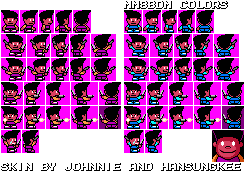
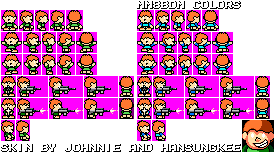
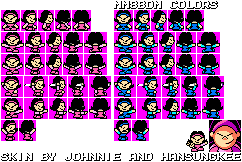
Tom Fulp/Past Darnell, Pico, Nene by Johnnie eletronic and Hansungkee
Making mods in my spare time
Known as: The Bloons mod guy.
July. 28, 2024, 3:51 AM (Edited by El cobra(SkullSnake))
Cobra's MM8BDM mod updates
Weekly mod news 28/7/2024 "I didn't do much this week"
Bloons mod: "Sniper UI clean up"
1. Slightly cleaned up sniper monkey UI for all weapons
Platformer mod: "More weapons"
1. New weapon: Crystal Eye! Fire a big crystal that splits into 3 small bouncy crystals on contact with terrain.
2. New weapon: Charge kick! slide through enemies and deal damage!
3. added SBARs to mm5 weapons, all the weapons still need balance adjustments,
Other:
1. published video "How to make MM8BDM weapons part1"
Plans for next week? A lot more work on the platformer mod, And no video to do this week! I'll be able to do a whole lot more mod work without worrying about a video deadline.
One point while I wasn't paying attention, there was a bug with the crystal eye that would multiply itself by three on each bounce, it was easy to fix but was funny to see.
Bloons mod: "Sniper UI clean up"
1. Slightly cleaned up sniper monkey UI for all weapons
Platformer mod: "More weapons"
1. New weapon: Crystal Eye! Fire a big crystal that splits into 3 small bouncy crystals on contact with terrain.
2. New weapon: Charge kick! slide through enemies and deal damage!
3. added SBARs to mm5 weapons, all the weapons still need balance adjustments,
Other:
1. published video "How to make MM8BDM weapons part1"
Plans for next week? A lot more work on the platformer mod, And no video to do this week! I'll be able to do a whole lot more mod work without worrying about a video deadline.
One point while I wasn't paying attention, there was a bug with the crystal eye that would multiply itself by three on each bounce, it was easy to fix but was funny to see.
Korby Administrator
Benvenuto nella room italiana!


July. 26, 2024, 9:51 PM (Edited by Korby)
FIGHTING PALETTES - Now supports Gondola v2.7!
Updated to support GondFM 72.5!
FP Gondola Support v1a ---> v1b
-- Fixed an error that occurred with Sunstar's skin because of necessary file replacements in FP.
-- Added in additional translation colors for all of Sunstar's Palettes for his rework in GondFM-72.5
-- Added in an additional translation color for the sprite Fuseman himself turns into while dashing/using his Speed Gear. This does not affect the blue trail he spawns while dashing, as that does not change color with anything related to the player's translations.
The download on the first post has been updated as a result.
FP Gondola Support v1a ---> v1b
-- Fixed an error that occurred with Sunstar's skin because of necessary file replacements in FP.
-- Added in additional translation colors for all of Sunstar's Palettes for his rework in GondFM-72.5
-- Added in an additional translation color for the sprite Fuseman himself turns into while dashing/using his Speed Gear. This does not affect the blue trail he spawns while dashing, as that does not change color with anything related to the player's translations.
The download on the first post has been updated as a result.
Wahahaha!


July. 26, 2024, 9:30 PM (Edited by Ukiyama)
Ukiweps (V4B)
Why hello there! Its been quite a while huh, new forums with a fresh new coat of paint, so why not a new Ukiweps getting a fresh coat of paint as well! Featuring a massive spike of 12 new weapons, a couple reworks, and a bunch of minor tweaks, this is the biggest update to Ukiweps I have ever done! Enjoy and have fun with V4A!
Download now!
Download now!
Alpha prepares for a brawl!
July. 26, 2024, 1:39 PM
How do you add mods for online play?
ThéophileCaceres said:
Put them in your skins folder, it should load everything inside after server configs.
That's the problem, it wont load them.
Allanx Inc Co-Owner, yuh.
I also like cats.
July. 26, 2024, 1:16 PM
How do you add mods for online play?
Put them in your skins folder, it should load everything inside after server configs.
Alpha prepares for a brawl!
July. 26, 2024, 10:29 AM
How do you add mods for online play?
I wanted to know since I see a lot of people using class taunts, hitsounds, killsounds, announcers, and win/lose music that only they can hear on their end. Thanks in advance.
A Skin Maker For MM8BDM
July. 25, 2024, 8:46 PM (Edited by Jacob Sadilek)
Jacob’s Skins of 2024
My First Post On The MM8BDM Forums
My MM8BDM Custom Skin Collection
All Skins Available On The Google Drive Link

My MM8BDM Custom Skin Collection
All Skins Available On The Google Drive Link